Support
Reply from the inbox
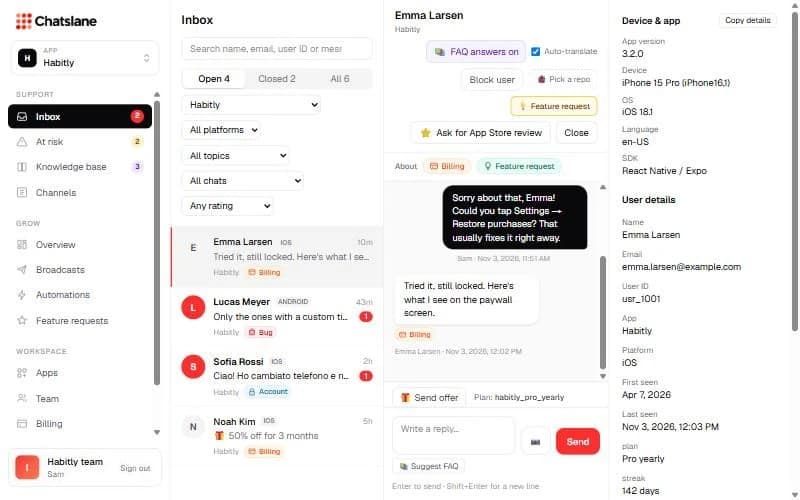
Every chat from every app in one place, with device details, topics and the user's subscription next to it.
Find a conversation
The inbox updates live. Search by name, email, user ID or message, switch between open, closed and all chats, and filter by app, platform, topic (Billing, Bug, Account, Feature request), chats that got an FAQ answer, or rating.
Reply
- 1Type in "Write a reply…". Enter sends, Shift+Enter adds a new line.
- 2Use the photo button to attach a JPG, PNG, HEIC, WebP or GIF (max 10 MB).
- 3Type / to insert a saved reply, or click "Suggest FAQ" to start from a matching FAQ answer.
- 4Hover a message and click "↩ Reply" to quote it.
Tip: When you reply, automatic FAQ answers pause in that chat, so the user keeps talking to a person.
Everything next to the chat
On the right you see the user's device and app version, their details, subscription, churn signals and privacy tools ("Export data" and "Delete user data").
At the top you can block a user, create a GitHub issue, add a feature request, ask for an App Store or Google Play review, and close the chat. Closing sends the user a 👍/👎 rating card.
Stuck? Email us at info@chatslane.com.