Support
Instant answers from your FAQ
Common questions get an approved answer within seconds. Chats never use AI: everything else goes to your team.
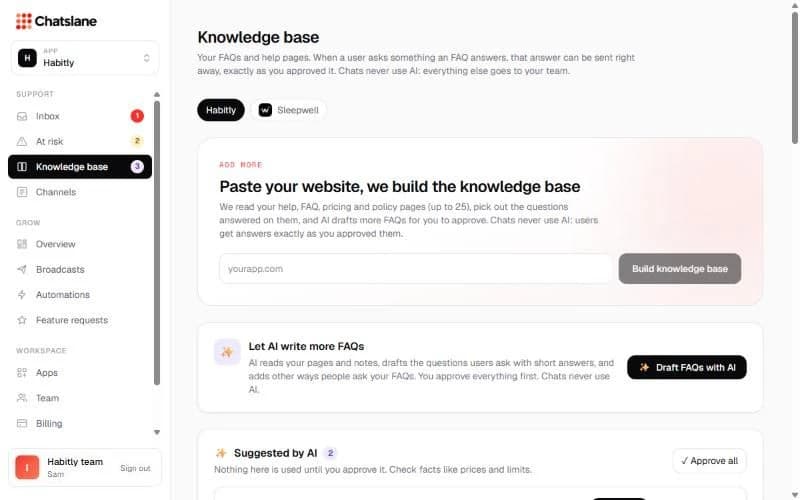
Build your knowledge base
- 1Go to Knowledge base and pick your app.
- 2Type your website under "Paste your website, we build the knowledge base" and click "Build knowledge base". It reads up to 25 help, FAQ, pricing and policy pages.
- 3Optionally click "Draft FAQs with AI" to get more suggested questions and answers.
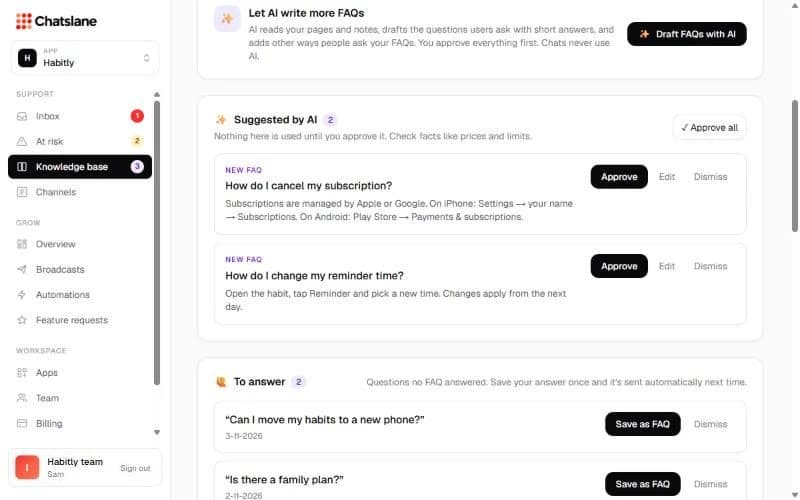
Approve what's used
Nothing is sent to users until you approve it. Check each suggestion under "Suggested by AI" and click "Approve", "Edit" or "Dismiss".
"To answer" lists questions no FAQ matched yet. Click "Save as FAQ" and it's answered automatically next time.
Sources and settings
Under "Sources" you can add a help page, an FAQ (with other ways people ask it) or a note, and refresh or edit them.
Under "Automatic answers", switch "Matching FAQs are sent automatically" on and choose when: always, set hours, or outside office hours. Use "Try it" to test a question without sending anything.
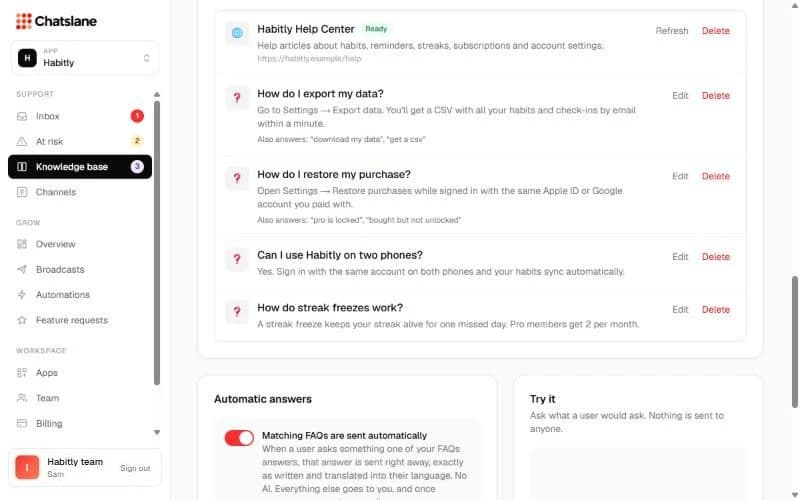
Tip: An approved answer is sent word for word, translated into the user's language. Once a person replies in a chat, automatic answers stop there.
Stuck? Email us at info@chatslane.com.